How to Take Meeting Notes (Without Becoming the Court Reporter)
By Jim Breese · · Updated
How do you take good meeting notes?
The consensus from a widely read r/projectmanagement thread, with over 150 replies from people who do this for a living, comes down to three habits: prepare before the meeting, capture selectively during it, and do one cleanup pass after. Nobody in the thread recommends typing every word said. The top comment, at 20 points, describes handwriting in personal shorthand during the meeting, then using the last few minutes to review and mark action items with an owner and a target date, before typing the whole thing up as minutes afterward.
One reply put the mindset shift best, at 8 points: "You're not trying to be a court reporter. Notes are an abbreviated subset of what was actually said." A separate commenter, at 10 points, made the same point about scope: typing every point made in the conversation isn't important, and the most important things to record are the decisions that were made, with a secondary summary of the discussion rather than a word-for-word transcript.
A third practice shows up across replies with real weight (9 points): prep matters more than any tool. One PM wrote that plenty of people bring up specialty software or AI, but most companies lock that out anyway, and what actually fixed their notes was preparation, using whatever tool work already provides, and religiously reviewing and cleaning notes up. Discipline, not software, was the fix that stuck.
What is the best meeting notes template?
The most concrete template in the same thread, at 8 points, is a table with one row per planned agenda topic, plus a parking-lot row and a row for follow-ups carried over from the last meeting. Its four columns: topic, notes, links or files, and actions. The commenter prefills the topic and notes columns before the call, so during the meeting there is only reacting, not typing from a blank page.
That table lines up with Teamwork.com's five components of a good meeting note: agenda item key points kept under three sentences each, action items assigned to a specific person with a due date, team ideas worth a follow-up, key questions raised with their answers, and the main decisions with the resulting next steps. Teamwork also recommends handwriting parts of the note to avoid what it calls "autopilot typing," where your hand copies words your brain never actually processed.
One rule from the template's own author matters more than the columns: get an owner and a due date assigned on the call itself. "If an action comes up without an owner or due date, try to get that assigned on the call, because no one will ever take that hot potato after." Action items without a name attached quietly die the moment the meeting ends.
For what to keep when you edit the raw notes down afterward, product designer Katie Riley's filter from Envoy's design team is a useful checklist: emotionally charged statements, disagreements or debates, decisions and action items, surprising information, and topics that got delayed or left unresolved. Her framing of the whole exercise: note-taking isn't stenography, it's transmitting information to people who need it but weren't in the room.
A separate subthread in the r/projectmanagement discussion, with 5 and 4 points on its two top replies, boils the template down even further with a RAID lens: the only meeting outputs worth documenting are Risks, Actions, Issues, and Decisions. If something isn't one of those four things, one reply argued, it usually isn't worth writing down, except maybe attendance and a one-sentence summary of what the meeting was about.
If you want the classic academic methods (Cornell, Outlining, Charting, and others) compared against this meeting-specific template, see note-taking methods compared.
Get the meeting notes template as PDF, Word, or Excel
The template above as a ready-to-use file: the agenda table with parking lot and follow-up rows, an action items table with owner and due date columns, and the cleanup checklist.
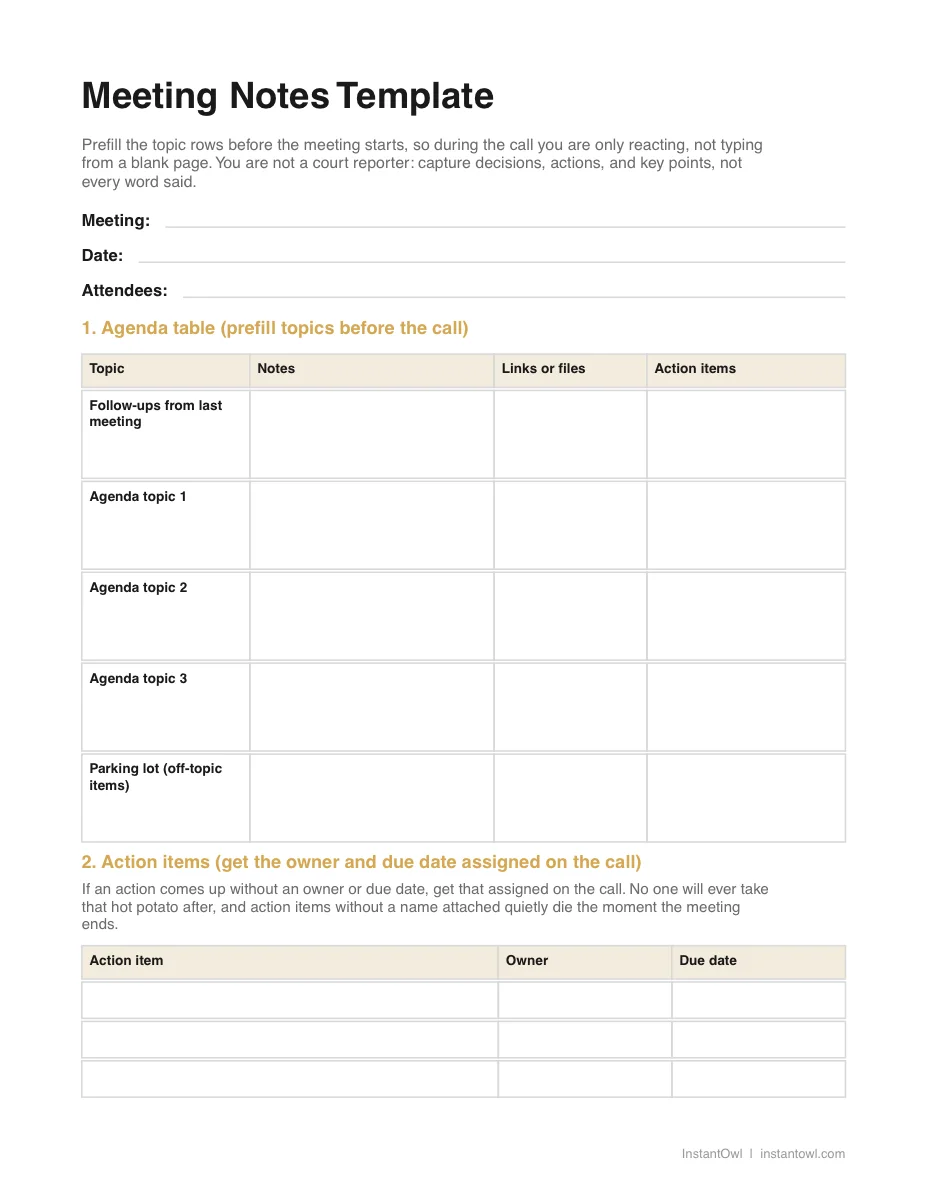
- PDF: print it or fill it on a tablet
- Word (DOCX): prefill the topic rows before each call and reuse it as a doc
- Excel (XLSX): for column lovers, one row per agenda topic
The DOCX and XLSX files open directly in Google Docs and Google Sheets, no download or conversion needed.
Why does note cleanup take so long after every meeting?
Because raw meeting notes are not the same thing as usable minutes (our guide to how to take meeting minutes covers what that formal record actually requires), and turning one into the other takes real time. Two separate commenters in the r/projectmanagement thread put the cleanup cost at an hour to an hour and a half per meeting. One added a flat "there's no way anyone can write that fast honestly," describing the gap between what gets said and what a person can capture live.
That cost compounds fast at volume. One commenter, at 6 points, said they run 6 to 7 meetings a day and have stopped sending minutes entirely, because there is no time left in the day to write them. That is not a discipline problem. It's arithmetic: at even 45 minutes of cleanup per meeting, 7 meetings a day is over 5 hours of after-hours typing nobody scheduled.
This is the real cost the "just take better notes" advice skips. The template in the section above shortens the gap between raw capture and a finished note, mostly by prefilling structure before the meeting starts. It does not remove the cleanup pass. Something still has to turn scribbled shorthand into a note someone else can read.
What's the real risk of using a meeting bot without asking first?
This is not legal advice, and the honest answer is: it depends on your employer's policy, and getting it wrong has real consequences. In the same r/projectmanagement thread, one commenter recommended recording work calls with Otter.ai on a personal laptop because their company locks down approved software. The top reply, at 17 points, did not mince words: "This is a security issue and can get you fired; do not take this advice."
A second workaround drew the same reaction. One reply described turning on a meeting's closed captions, copying the transcript, and pasting it into ChatGPT with a prompt to summarize the meeting into bullet points. The top response, at 15 points, called it "how to get fired for NDA breaches 101," and another warned that pasting a work transcript into a consumer AI tool likely violates a company's AI usage policy outright.
The most thorough comment on the topic laid out why this isn't a personal-preference question: check company policy before recording anything, because some organizations require every participant to be informed and to agree before a meeting is recorded, for legal, contractual, or security reasons. That same comment also warned to always review an AI-generated summary before sending it out, since a garbled multi-speaker transcript can cause an AI tool to miss the point that actually mattered.
If a bot or transcript tool is genuinely useful for your role, one commenter's middle ground is worth copying: put a line on the meeting agenda stating that transcription software is in use to help produce the minutes, let people object if they need to, and only start recording after the pre-meeting small talk ends. Consent stated up front costs one sentence. Getting caught without it can cost a job.
When is a meeting bot actually the right call?
When your company has sanctioned one, and your job is genuinely built around back-to-back external calls. Recruiters, salespeople, and customer-facing PMs who spend most of a day on calls with people outside their own company are a different case than an internal standup (the after-call debrief that keeps back-to-back sales calls from blurring together is a habit worth building on its own): an approved tool with a clear data policy removes the guesswork the sections above warn about. A recurring one-on-one is a different format again, built on trust and a shared agenda rather than a formal record; our one-on-one meetings guide covers what actually belongs on that page.
If that's your situation, our Otter.ai review covers what it actually costs, what its free plan includes, and how to remove it from a call if someone forgot to ask first. Our Otter alternatives roundup breaks options down by job instead of by hype, including notetakers built specifically for meetings that carry unlimited free transcription with a company's blessing. Pick the tool for your actual job, not the loudest ad for it. And if your company already records its calls in Zoom itself, transcribing the Zoom recording you already have may cover the whole job without adding any bot to the room.
Is there a way to get organized notes without recording the room?
Yes, and it sidesteps the whole consent question above, because you never record anyone but yourself. Full disclosure: InstantOwl is our product, and this blog belongs to it. The same two-step pattern shows up throughout the r/projectmanagement thread already: capture something messy during the meeting, then spend 60 to 90 minutes tidying it into real notes afterward. That second step is what InstantOwl replaces.
The moment a meeting ends, before the next one starts, talk for two minutes: what got decided, what you owe someone, what someone owes you, and who owns what. Say it the way you'd say it to a coworker, not the way you'd write it. InstantOwl turns that ramble into organized notes with the decisions and action items pulled out, because that debrief is your voice only, recorded after the fact, with nothing from anyone else in the room. There is no policy question to check first. InstantOwl is currently free to use.
This fits the exact gap the sections above describe: prep and a template make the meeting itself faster to capture, but the cleanup pass is still yours to do by hand, and a bot in the room isn't always allowed or wanted. A two-minute debrief in your own voice, right after the meeting while it's still fresh, closes that gap without asking anyone else's permission to record.
Related reading
- Otter.ai: what it costs, what its free plan actually includes, and how to remove it from a call.
- Otter.ai alternatives: notetakers, transcription, and personal capture tools sorted by the job they actually do.
- Note-taking methods compared: Cornell, Outlining, Charting, and the rest, measured against what a meeting actually demands.
Frequently asked questions
What should meeting notes include?
Per Teamwork.com's guide, meeting notes need five things: agenda item key points kept under three sentences each, action items assigned to a specific person with a due date, ideas worth a follow-up, key questions and their answers, and the decisions reached along with the next step. A large r/projectmanagement thread narrows this further with a RAID lens: if something isn't a Risk, Action, Issue, or Decision, it usually isn't worth writing down.
What is the best meeting notes template?
The most concrete template shared in a widely read r/projectmanagement thread is a table with one row per planned agenda topic, a parking-lot row for off-topic items, and a follow-ups-from-last-meeting row, with four columns: topic, notes, links or files, and actions. The commenter prefills the topic and notes columns before the meeting starts, so during the call there is only reacting to add, not typing from a blank page.
Is it OK to record meetings?
It depends entirely on your organization's policy, and this is not legal advice. The most detailed comment on the topic in a project management Reddit thread warns to check company policy first, since some organizations require every participant to be told and to agree before a meeting is recorded, for legal, contractual, or security reasons. Replies to two different recording workarounds in the same thread both warned the tool or method described could get someone fired.
How do I take notes in back-to-back meetings?
Triage them by importance, per one r/projectmanagement commenter: low-priority meetings only need action items and a couple of key snippets, while medium-and-up meetings get a pre-circulated agenda and a verbal recap of decisions and owners at the end of each item. A PM running 6 to 7 meetings a day said in the same thread they had simply stopped writing full minutes for the lower-stakes calls, because there was no time left to do it.

Written by
Jim BreeseJim Breese is the founder of InstantOwl. He's spent 15 years building companies, from an Airbnb host community he founded and exited to growth leadership at venture-backed SaaS startups. He built InstantOwl because his best ideas kept arriving mid-walk, out of order, and half-finished.
Stop losing good ideas.
InstantOwl turns a rambling voice note into a clean, organized document in moments. Just talk. We'll organize it.
 Try InstantOwl free