One-on-One Meeting Template: What Actually Belongs on the Page
By Jim Breese · · Updated

What should a one-on-one template include?
A one-on-one template needs nine things: a header with names and date, a personal check-in, a review of prior action items, current work and wins, blockers and support needed, two-way feedback, periodic career development, dual next steps for both people, and the next meeting date. That is the convergence across three otherwise unrelated sources: a university HR department, a management-training firm, and a leadership-development blog, all describing the same weekly meeting.
Unstuckbox publishes 12 separate templates by use case (weekly check-in, onboarding, remote, career development, skip-level, and more), each downloadable as PDF, DOCX, Google Docs, or an Excel tracker. Its core sections match what shows up everywhere else: rapport, prior action items, employee agenda first, manager topics second, bidirectional feedback, periodic development, and documented next steps.
Clemson University's HR department publishes a one-page one-on-one meeting template, authored by Elizabeth M. Hart in 2019, that is the most concrete field list of the three. A university HR template has to survive being handed to hundreds of first-time managers with zero training, so it stays plain: "This is an example of a template you can use for your one-on-one meetings with your employees. Please feel free to modify as desired." One page, no more.
Clemson's Next Steps section deserves its own callout, because it is explicitly dual: "What can you do to take action or make progress on what we talked about today? What can I do to take action or make progress on what we talked about today?" Most one-on-one advice online is written for the manager only. Clemson's template documents the report's commitment and the manager's commitment as equally real, and that framing is what the template below borrows directly.
LifeLabs Learning frames the same meeting in three phases. Before: both people prep and review past discussions. During: rapport, wins, progress, challenges, a CAMPS check-in (certainty, autonomy, meaning, progress, social inclusion), then roadblocks and support. After: recap action items and preview the next meeting. Its dual-role table lists what a manager owes the meeting (craft the agenda's discussion points, coach in question mode, prepare balanced feedback, take detailed notes) next to what a report owes it (come prepared with a filled-in agenda, align goals with team objectives, bring development goals, treat it as their growth opportunity).
The one-on-one meeting template
Here is the one-page version, built from the fields all three sources converge on. Copy it into a doc or notebook and use it as-is, or grab it as a ready-made file below.
ONE-ON-ONE MEETING TEMPLATE

WITH: _____________________________   DATE: _____________________

CHECK-IN
How are things going generally? How are you feeling?


PRIOR ACTION ITEMS (from the last meeting)
-
-

CURRENT WORK, PROGRESS + WINS
What have you been working on? What's gone well? What do you want to improve?


BLOCKERS + SUPPORT NEEDED
What's slowing you down right now? What can I do to help?


FEEDBACK (both directions)
Report to manager: what's one thing I could do differently?
Manager to report: observations, wins to celebrate, follow-up requests


DEVELOPMENT (periodic, not every meeting)
What are you enjoying most in your work? What are you proud of from the
past year? Where do you want to be in the next year or two? What can I
do to help you get there?


NEXT STEPS (both people commit)
What will YOU do to make progress on what we talked about today?
What will I do, as the manager, to make progress on what we talked
about today?

NEXT MEETING DATE: _________________________
The development section is marked periodic on purpose. Every source treats it as a real, recurring topic, but not a weekly one: it belongs in the rotation every few meetings, not squeezed into 30 minutes alongside blockers and feedback every single week.
Get the template as PDF, Word, or Excel
Download the same template above as a print-ready file, or a version you can edit and reuse for every report.
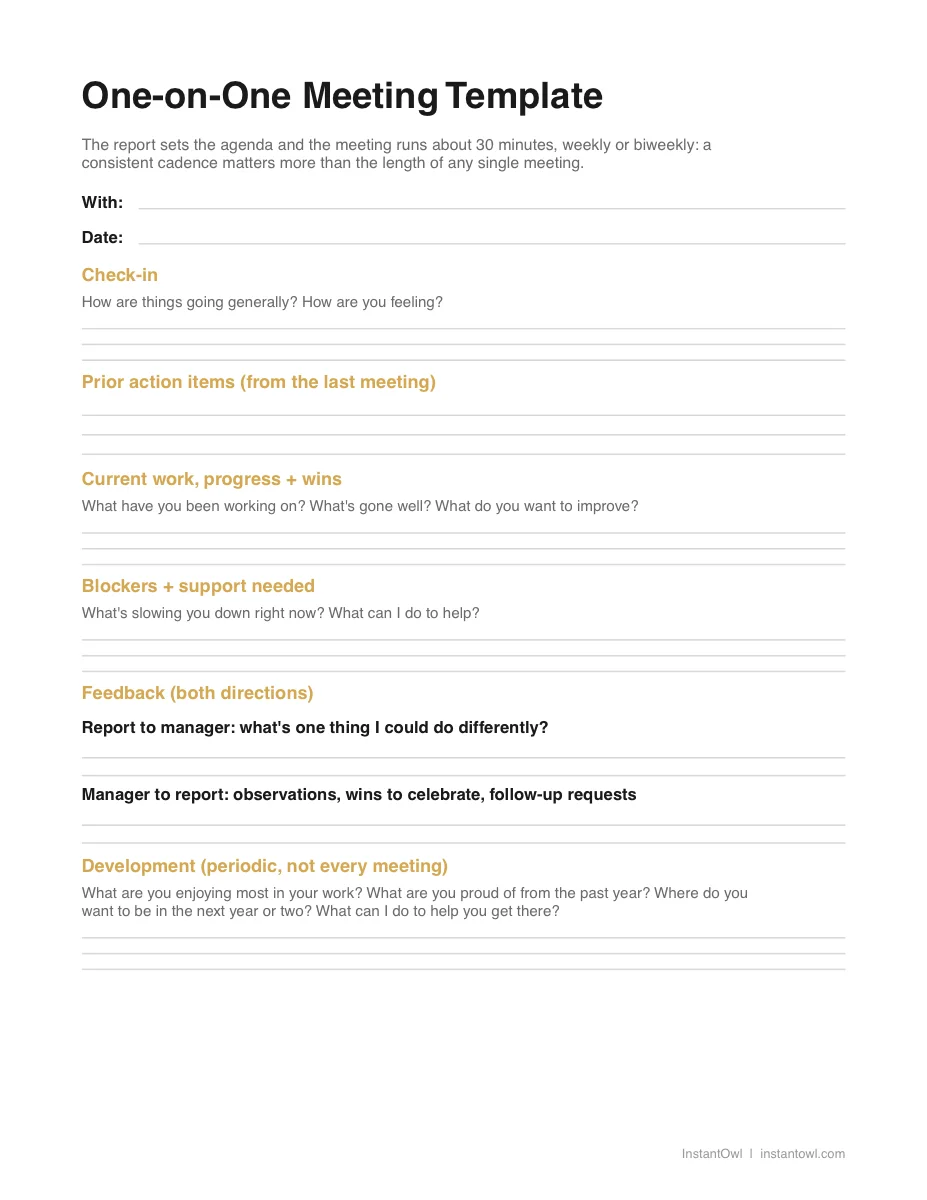
- PDF: print it or fill it on a tablet
- Word (DOCX): keep one copy per report and fill it in before each meeting
- Excel (XLSX): track action items and next-meeting dates across your whole team in one sheet
The DOCX and XLSX files open directly in Google Docs and Google Sheets, no download or conversion needed. Upload them or open with Google Drive and start typing.
How do you run a one-on-one meeting?
Run it weekly or biweekly for 30 minutes, with the report setting the agenda first. That is the converged guidance from Unstuckbox and LifeLabs Learning, and both name employee-led agendas as the standard rather than the exception.
Unstuckbox puts cadence on a scale: weekly is optimal, biweekly is acceptable, monthly is the floor. Meeting length runs 30 to 60 minutes, with 30 fitting an established weekly check-in and 45 to 60 reserved for monthly or quarterly deep-dives. LifeLabs Learning lands in the same range: weekly or biweekly, 30 to 60 minutes, with the direct report arriving already having filled in their own agenda items rather than waiting to be asked what's on their mind.
The dual perspective is where most one-on-one content stops short. Nearly everything written about this meeting, including all three sources above, is aimed at the manager. If you're the report, the same template works from your side: bring your own filled-in agenda items instead of waiting for the manager to open with a question, own your line in the Next Steps section, and treat the development block as your checkpoint to raise, not something you wait for your manager to bring up first.
One-on-one questions, organized by purpose
A short question bank, pulled from the same three sources and organized by what each question is actually trying to surface.
Check-in. "What's been the highlight of your week?" (Unstuckbox); "How are things going generally? How are you feeling?" (Clemson).
Current work and priorities. "What would you deprioritize if you had to drop one thing?" (Unstuckbox); "Tell me about what you are currently working on. What has gone well? What do you want to improve?" (Clemson).
Blockers and support. "What's slowing you down right now?" (Unstuckbox); "What can I do to help?" (Clemson).
Feedback. "What's one thing I could improve?" (Unstuckbox); LifeLabs Learning's stretch question, "What could I do as your manager to support you better?"
Development and growth. "Where do you want to be in 12 months?" (Unstuckbox); "What are your career goals for the next year or two? Do you feel you're growing toward where you want to be?" (Clemson); LifeLabs Learning's stretch questions, "When are you at your best, and what conditions create it?" and "What skills do you want to develop?"
LifeLabs Learning also offers a coaching structure worth borrowing when a blocker needs more than a quick answer, called SOON: Success (what's working), Obstacles (what's in the way), Options (what could help), and Next Steps (what happens now). It turns "I'm stuck" into a short conversation instead of a one-line status update.
What does the research actually say about one-on-ones?
Both Unstuckbox and LifeLabs Learning cite Gallup research linking regular one-on-ones to higher employee engagement. Neither links a primary Gallup study we could verify independently, so we are not printing a specific multiplier here. What both guides converge on, independently of any one number, is the direction: showing up for the meeting consistently, on a fixed cadence, matters more to engagement than any single question asked inside it.
That is also the one piece of advice repeated word for word across every source in this post: consistency beats length. A shorter meeting that happens every week, without fail, does more than a long one that gets rescheduled twice a month.
What happens after the one-on-one?
Nothing in Unstuckbox, Clemson's template, or LifeLabs Learning's guide solves what happens the moment the meeting ends. Someone still has to turn a page of check marks and half sentences into notes both people can actually find again, with each side's commitment written down clearly enough to act on. That's the same gap covered in how to take meeting notes and, for anyone who needs a formal, approved record, how to take meeting minutes.
Full disclosure: InstantOwl is our product, and this blog belongs to it. Right after a one-on-one, before the next meeting on your calendar starts, talk for about two minutes: what got discussed, what you're committing to, and what your report or your manager committed to. Say it the way you'd explain it to a coworker, not the way you'd write it. InstantOwl turns that into structured notes with both people's action items pulled out and labeled, so the "Next Steps" line on the template above gets filled in from what was actually said, not from a half-remembered scribble an hour later. The same debrief habit serves a coach capturing what came up in a client session, where the useful record is the insight, not a transcript. InstantOwl is currently free to use.
If your one-on-ones need an auto-joining notetaker instead, because you run them over video with a tool your company already sanctions, our Otter.ai review covers what it costs and how it works. A two-minute solo debrief and a meeting bot solve different problems: one only records your own voice after the fact, the other records the room while it's happening.
Frequently asked questions
What should I cover in a one on one?
Cover a check-in, a review of prior action items, current work and wins, blockers and support needed, two-way feedback, career development on a periodic basis, and next steps for both the manager and the report. That is the field list all three sources in this post converge on.
Who sets the one on one agenda?
The report sets the agenda first. Unstuckbox and LifeLabs Learning both describe the direct report arriving prepared with their own topics, and the manager adding items second, coaching in question mode rather than running the meeting top down.
How long should one on ones be?
Thirty minutes for a regular weekly or biweekly check-in, stretching to 60 minutes for a monthly or quarterly deep-dive. Unstuckbox and LifeLabs Learning both land in this range, and both treat a consistent cadence as more important than the length of any single meeting.
What should I ask in my first one on one?
Start with Clemson's development questions: what activities in their job they enjoy most, what they're proud of from the past year, what their career goals are for the next year or two, and what you can do to help. Add a plain check-in on how they're doing generally before any of it.
Related reading
- How to take meeting notes: the same after-the-meeting problem, for group meetings instead of one-on-ones.
- How to take meeting minutes: the formal, approved version of a meeting record, if your one-on-ones need one.
- Otter.ai: what it costs and how it works, if you need an auto-joining notetaker for video one-on-ones.
Frequently asked questions
What should I cover in a one on one?
Cover a check-in, a review of prior action items, current work and wins, blockers and support needed, two-way feedback, career development on a periodic basis, and next steps for both the manager and the report, per the convergence across a university HR template, Unstuckbox, and LifeLabs Learning.
Who sets the one on one agenda?
The report sets the agenda first, per the consensus across Unstuckbox and LifeLabs Learning: the direct report comes prepared with their own topics, and the manager adds items second, coaching in question mode rather than running the meeting top down.
How long should one on ones be?
Thirty minutes for a regular weekly or biweekly check-in, up to 60 minutes for a monthly or quarterly deep-dive, per Unstuckbox and LifeLabs Learning. Both guides treat consistency of cadence as more important than the length of any single meeting.
What should I ask in my first one on one?
Ask what activities in their job they enjoy most, what projects from the past year they are proud of, what their career goals are for the next year or two, and what you can do to help, per Clemson University HR's development questions, plus a plain check-in on how they are doing generally.

Written by
Jim BreeseJim Breese is the founder of InstantOwl. He's spent 15 years building companies, from an Airbnb host community he founded and exited to growth leadership at venture-backed SaaS startups. He built InstantOwl because his best ideas kept arriving mid-walk, out of order, and half-finished.
Stop losing good ideas.
InstantOwl turns a rambling voice note into a clean, organized document in moments. Just talk. We'll organize it.
 Try InstantOwl free