How to Take Meeting Minutes (The Formal Record, Without Drowning)
By Jim Breese · · Updated
What are meeting minutes?
Meeting minutes are the formal, approved, and archived official record of what happened in a meeting, not a personal memory aid. Governance software company BoardBook describes them as "legal documentation" that serves as "legal evidence, validating the board's adherence to statutory requirements." That framing is specific to boards, HOAs, nonprofits, and committees, but it explains why minutes carry more weight than ordinary notes.
Meeting-minutes software company iBabs splits meeting records into six types: executive, verbatim, informal, formal, discussion, and action-only. The informal-versus-formal split matches the real distinction people search for: informal minutes work like a loose memory aid, while formal minutes follow a strict structure (call to order, approval of previous minutes, reports, discussions, votes, action items) and typically get approved and signed. If what you actually need is the informal version, our guide to taking meeting notes covers that case directly.
The word "minutes" has nothing to do with clock time. Per iBabs, it comes from the Latin "minuta scriptura," meaning "small notes," a reference to the summarized style rather than duration. One minute-taker in a widely read r/adhdwomen thread said she genuinely thought "take minutes" meant writing down how many minutes the meeting took. The etymology says the opposite: minutes were always meant to be short.
What must minutes contain?
Formal minutes need a specific set of procedural fields, not a running transcript. Per BoardBook and iBabs, the essential components are: the organization name, date, time, and location; attendance, including absent members and guests; the call to order (when and by whom); approval of the previous minutes; motions and resolutions with the mover, seconder, and vote outcome; discussion summaries covering key points and questions raised; decisions made; action items with an assignee and a deadline; the adjournment time; and signatures from the secretary and chair certifying the record.
That is a lot of boxes to fill, which is why a template built from the agenda before the meeting starts matters more than any note-taking skill. BoardBook calls minute-taking "the art of summarization," not verbatim recording, and instructs the minute-taker to stay "an objective and impartial observer," leaving out personal opinion.
The action-items layer is where a simpler framework helps. The top comment in the r/adhdwomen thread, at 21 points, described dropping full bullet-point summaries because "it's a waste of time and no one ever reads them," in favor of one format: issues, actions, responsible, timeframe. Her claim: "most meetings (regardless of how long they take) can be summed up in under 10 action points." Several replies confirmed their own workplaces use the same shape.
Get the minutes template as PDF, Word, or Excel
Every field above, prebuilt: meeting details, attendance with absentees, call to order, approval of previous minutes, motions with mover, seconder, and vote outcome, action items with assignee and deadline, adjournment, and signature lines.
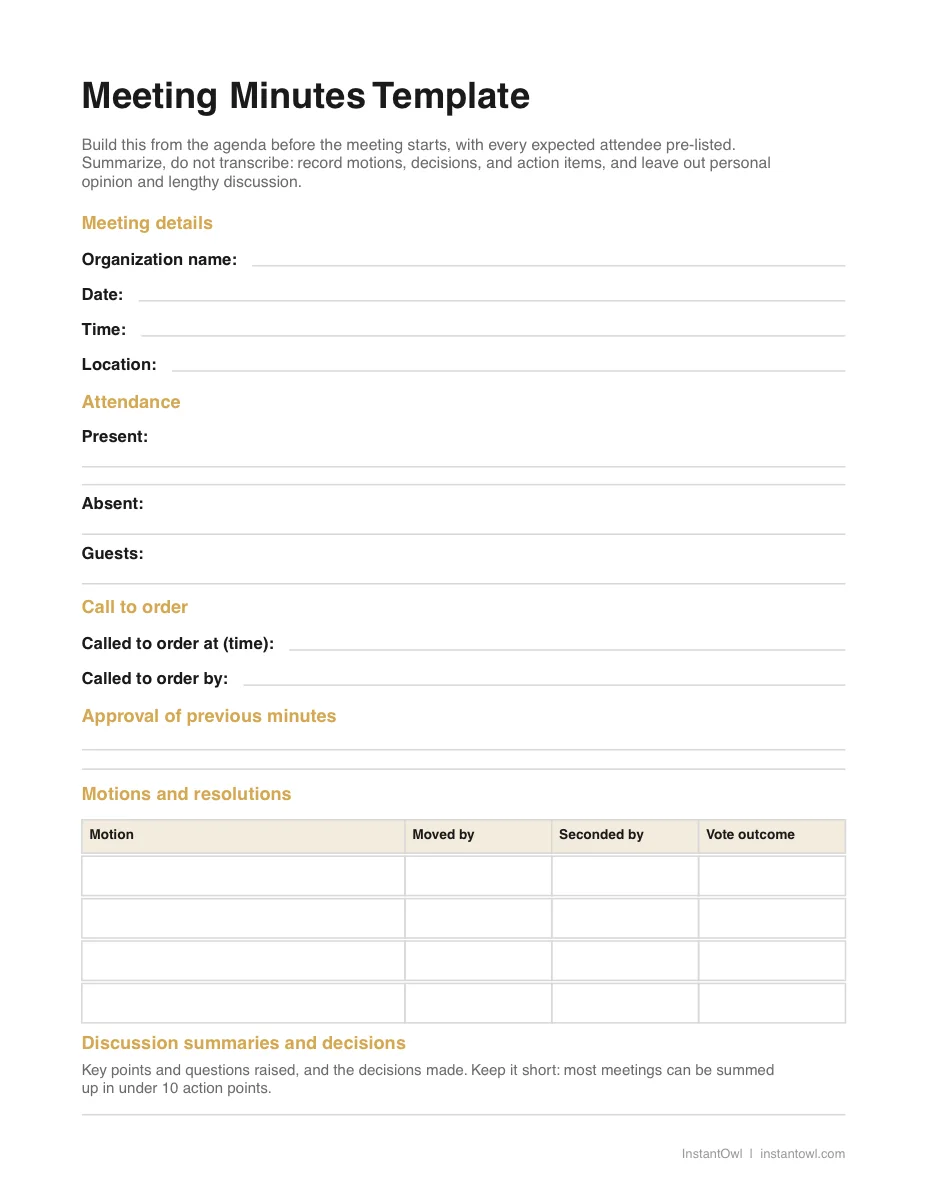
- PDF: print it or fill it on a tablet
- Word (DOCX): put it on your letterhead and reuse it as a doc
- Excel (XLSX): for column lovers, with motion and action item tables
The DOCX and XLSX files open directly in Google Docs and Google Sheets, no download or conversion needed.
Why taking minutes is genuinely hard
Recording a meeting does not solve minutes, because the hard part is deciding what to leave out, not capturing what was said. The clearest evidence of this comes from the original poster in the r/adhdwomen thread: she already recorded her meetings, "with permission from the attendees," and still could not figure out "how do you figure out what is essential and what can be cut out." Capture was never the bottleneck. Distillation is.
iBabs, a company that sells governance software, admits the same thing about its own category. Transcription tools "can be inaccurate," and even an accurate transcript forces you "to listen to the entire meeting while reading the transcript to verify it is correct." Their own best-practice line is blunt: "summarise, don't transcribe." A perfect word-for-word record is the wrong detail level for a formal record, not a shortcut to one.
The scale of the problem is bigger than any one meeting. iBabs' 2024 State of Meeting Management report found 22% of respondents spend over half their working week in meetings, yet only 65% said someone at their organization actually takes and distributes minutes afterward. More than a third of meetings that plausibly need a record simply do not get one.
The emotional cost shows up all over the same thread. One minute-taker celebrated finishing early for once: "I SUBMITTED THE MINUTES LAST NIGHT INSTEAD OF RIGHT BEFORE THE NEXT MEETING IN A BLIND PANIC LIKE I USUALLY DO!!!" Another called the task simply "my worst nightmare. No tips, sorry." A third admitted to over-including everything "and I know for a fact no one ever read them anyway," a comment several others echoed almost word for word.
The workflow that works
The pattern that keeps showing up among people who actually do this job well is the same: capture messy, distill immediately, formalize into the template last. One commenter who does formal board minutes described handwriting notes during the meeting to stay focused, sending out a same-day action sheet, then producing the polished formal minutes later. Others save the agenda as a working document and add notes under each relevant item as the meeting happens, rather than trying to write clean sentences in real time.
iBabs' own nine-step process backs this up: review your rough notes soon after the meeting, while memory is still fresh, before producing the final draft. Several minute-takers in the thread already pair that principle with AI. One gets a transcript from the recording, plugs it into ChatGPT, and asks it "to pop out a summary with action items." Another takes shorthand bullets during the meeting, then tells ChatGPT afterward to "rewrite them to be proper minutes," puts the result on letterhead, and emails it out.
InstantOwl's version of that same pattern is a spoken debrief instead of typed notes. Right after the meeting, while it is still fresh, you talk for about two minutes: what got decided, who owns what, and any deadlines that came up. The AI turns that into a structured summary you paste into your formal minutes template.
Here is the honest limit of that step: the voice debrief only drafts the summary layer. The procedural fields BoardBook and iBabs both require, attendance, the call to order, motions with mover and seconder and vote outcome, and the adjournment time, still come from your agenda and your own notes during the meeting, not from a two-minute recap after it ends. The official record still needs to go through approval and get signed by the secretary and chair before it counts as minutes rather than a draft.
A few small habits from the thread make either version easier: sit next to the chairperson if you can, since they will often flag what needs to be recorded; reserve the last five minutes of the meeting to read back the action items and confirm you got them right; and build your template from the agenda in advance, with every expected attendee pre-listed so absentees are a quick edit instead of a memory test.
Honest caveats
Recording a meeting to help you write minutes is not automatically fine, and this is not legal advice. In the r/adhdwomen thread, the original poster only records "with permission from the attendees." One reply went further: her country legally requires telling everyone present before a meeting is recorded at all. Check your organization's policy and your local law before you press record.
Confidentiality is a separate concern from consent. The same reply raised a real objection to AI tools generally: "considering we have a tight NDA I'd be very apprehensive to using AI for meeting notes," since many AI companies "continue to train their AI with the user input." Her employer bought a premium tier specifically because it excludes user data from training. iBabs' own guidance agrees on the underlying point: confidential details should be left out of minutes entirely, whatever tool produces them.
Retention rules exist too, and they can outlast the meeting by years. Per iBabs, the UK's Companies Act 2006 requires board minutes to be kept "for at least ten years from the date of the resolution, meeting or decision." A formal record is not something you draft once and forget; find out what your organization's retention policy actually requires before you decide how and where to store it.
Where InstantOwl fits
Full disclosure: InstantOwl is our product, and this blog belongs to it. It is not built to replace your meeting minutes template, your approval process, or your organization's recording policy. What it does is give you a fast, honest way to capture the summary layer while it is still fresh in your head: talk through decisions, owners, and deadlines for about two minutes right after the meeting ends, and get back a structured draft you paste into the formal record. InstantOwl is currently free to use.
If your organization's minutes have to be verbatim, or your policy requires an auto-joining meeting notetaker, a tool built for that job, like Otter.ai, is a better fit than a post-meeting debrief. InstantOwl is for the person who leaves a meeting holding the decisions in their head and needs them out fast, before the next meeting starts and the details blur together.
Related reading
- How to take meeting notes: the informal version of this same job, with the template that works for it.
- Note-taking methods compared: Cornell, Outlining, Mapping, and five other ways to capture what happens live.
- Otter.ai: pricing and what it actually does, if you need an auto-joining meeting notetaker instead.
Frequently asked questions
What should meeting minutes include?
Per BoardBook and iBabs, minutes need the organization name, date, time, and location, attendance including absentees, the call to order, approval of the previous minutes, motions with the mover, seconder, and vote outcome, decisions made, action items with an assignee and deadline, discussion summaries, and the adjournment time, closed out with the secretary and chair's signatures.
What is the difference between minutes and notes?
Minutes are the formal, approved, and often signed official record, usually required for boards, HOAs, nonprofits, and committees, per iBabs' own formal-versus-informal typology. Notes are for you: a personal aid with no approval step and no fixed format. See our guide to taking meeting notes for the informal case.
Can I record a meeting to write minutes?
It depends on your organization's policy and your local consent laws, and this is not legal advice. One minute-taker in a widely read r/adhdwomen thread only recorded meetings after getting permission from every attendee; another noted her country legally requires telling everyone present before recording starts.
How long should meeting minutes be?
Long enough to capture decisions, action items, and key discussion points, and no longer, per iBabs' own guidance to 'summarise, don't transcribe.' BoardBook makes the same call: exclude lengthy transcripts, personal opinion, and irrelevant discussion. A page or two of formal minutes usually covers even a long meeting.

Written by
Jim BreeseJim Breese is the founder of InstantOwl. He's spent 15 years building companies, from an Airbnb host community he founded and exited to growth leadership at venture-backed SaaS startups. He built InstantOwl because his best ideas kept arriving mid-walk, out of order, and half-finished.
Stop losing good ideas.
InstantOwl turns a rambling voice note into a clean, organized document in moments. Just talk. We'll organize it.
 Try InstantOwl free