The Weekly Review: GTD's Official Checklist, and a 30-Minute Version
By Jim Breese · · Updated
What is a weekly review?
A weekly review is a fixed block of time, once a week, where you process everything that came in, catch your lists and calendar up to reality, and decide what matters next. The practice comes from David Allen's Getting Things Done (GTD) method, and its official version is a checklist of 11 steps organized into three phases: Get Clear, Get Current, and Get Creative.
The David Allen Company publishes the checklist itself as a free, downloadable PDF, and it is the authoritative version of every step below. The official Weekly Review Checklist carries a copyright line of 1990-2006 and has not changed since. Any paraphrase of the GTD weekly review online, including the rest of this page, traces back to it.
Get Clear means processing every loose piece of input, paper, notes, voicemail, and anything still only in your head, until your capture system is empty. Get Current means checking your lists, calendar, and projects against reality so nothing on them is stale. Get Creative is the shortest phase: a chance to look at dormant ideas and add anything new before you close the review out.
The point of doing this every week, rather than whenever you remember to, is that daily work drifts from long-term goals without a regular check. Guides built on GTD frame the weekly review as the fix for that drift: dedicated time to reflect on the past week and plan the next one, so what you do day to day still lines up with what actually matters. Skip it long enough and the familiar feeling shows up, wondering what you were even doing with your time all week.
A weekly review is also not meant to be a performance review of yourself. Guides built on GTD are explicit that the tone should stay objective and kind, noting what got done and what did not without turning it into self-criticism. That framing matters here specifically, since the checklist below is long enough that treating a partial pass as a personal failure is the fastest way to stop doing it at all.
What are the 11 steps of the GTD weekly review?
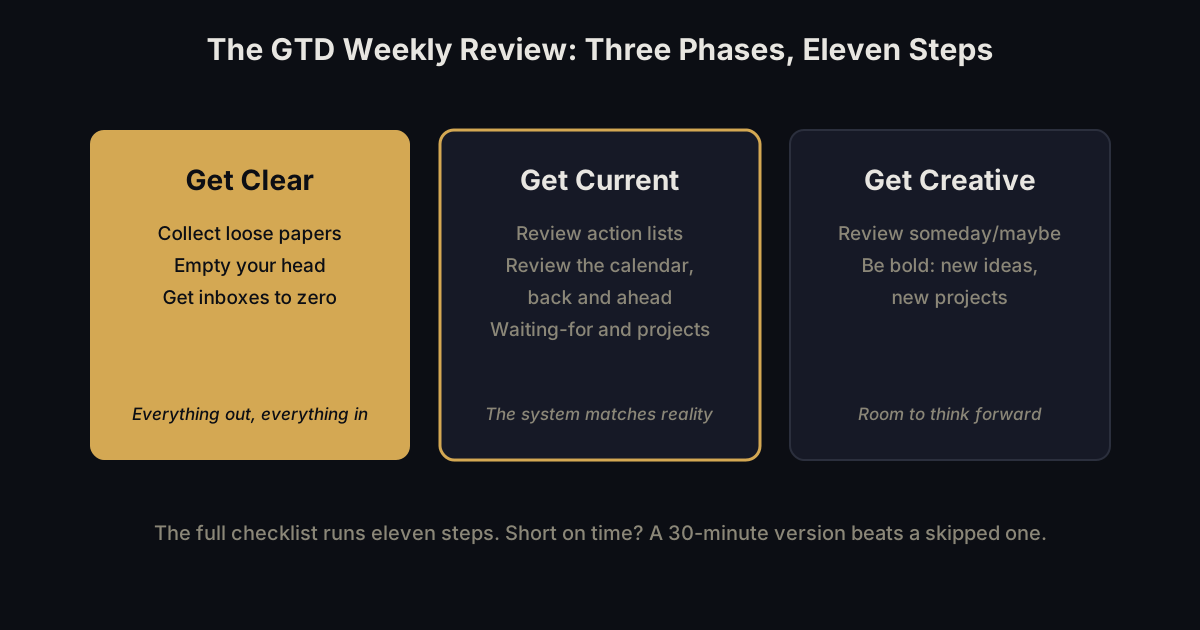
The GTD weekly review has 11 steps across the three phases above, all quoted from the David Allen Company's official checklist. Get Clear covers input, Get Current covers your lists and calendar, and Get Creative covers dormant ideas and anything new.
Get Clear
- Collect Loose Papers and Materials: "Gather all accumulated business cards, receipts, and miscellaneous paper-based materials into your in-tray."
- Get "IN" to Zero: "Process completely all outstanding paper materials, journal and meeting notes, voicemails, dictation, and emails."
- Empty Your Head: "Put in writing and process any uncaptured new projects, action items, waiting for's, someday maybe's, etc."
Get Current
- Review Action Lists: mark off completed actions, and note any further action steps to record.
- Review Previous Calendar Data: check the past calendar in detail for remaining action items or reference data, and move them into your active system.
- Review Upcoming Calendar: scan upcoming events, both near and far, and capture whatever actions they trigger.
- Review Waiting For List: record any follow-up an item needs, and check off what has already come in.
- Review Project (and Larger Outcome) Lists: confirm every project and goal has at least one current action item, and browse supporting material for anything new to add.
- Review Any Relevant Checklists: use each one as a trigger for actions you might have missed.
Get Creative
- Review Someday Maybe List: move anything now active over to Projects, and delete what no longer interests you.
- Be Creative and Courageous: the checklist's own wording for the final step is "Any new, wonderful, hare-brained, creative, thought-provoking, risk-taking ideas to add into your system???", triple question marks included in the original.
That is the entire checklist, unchanged since 2006. It works. It also takes a while, and length is exactly where most people's weekly review dies. If you keep a broader system for storing what you learn alongside GTD's action lists, our overview of the second brain method covers how that piece is usually organized.
How long should a weekly review actually take?
Guides built on top of GTD commonly recommend one hour as the minimum for the full checklist, and that is honest advice for all 11 steps done properly. It is also the reason a weekly review is one of the first habits people drop: an hour is a lot of calendar space to protect every single week.
A realistic alternative is a 10/15/5 split: 10 minutes for Get Clear, 15 for Get Current, 5 for Get Creative. Thirty minutes total, the same three phases in the same order, just compressed to the parts that carry the most weight in a normal week.
Get Clear (10 minutes): sweep your physical and digital inboxes to zero, then spend the rest of the time emptying your head of whatever is still not written down.
Get Current (15 minutes): look back at last week's calendar, forward at next week's, check your action list, and confirm every project has a next step. Skip the checklist-review step if nothing has changed since last time. If next week is heavy on recurring one-on-ones, this is also the moment to capture talking points for them; our one-on-one meetings guide covers what belongs on that shared agenda.
Get Creative (5 minutes): skim your someday-maybe list and leave room for one new idea, no matter how impractical it sounds. That closes the review.
This is not a replacement for the full GTD checklist above. It is the version that actually happens most weeks, and a 30-minute review done every week beats a full-hour one that gets skipped after a month.
Can you do a weekly review out loud?
Yes. GTD's own checklist already treats talking as a valid input: step 2, Get "IN" to Zero, explicitly lists processing "dictation" alongside paper and email, and step 3, Empty Your Head, is a brain dump under another name. Talking through your week is not a shortcut around GTD. It is two of GTD's own steps, done the way the checklist already describes them.
Say what happened this week, what is still open, what is waiting on someone else, and what you are worried you are forgetting, out loud, the way you would tell a friend. That covers Empty Your Head and most of Get Current's review questions in one pass, before you open a single list.
Full disclosure: InstantOwl is our product, and this blog belongs to it. It records what you say and turns the ramble into organized notes and action items, the same shape a written weekly review produces, without you typing any of it. InstantOwl is currently free to use.
Talking does not replace looking at your calendar or your project list; Get Current still needs those open in front of you. It replaces the hardest part, getting everything out of your head in the first place, with the fastest input method there is. Our voice journal post covers what a daily version of the same habit looks like.
How do you make a weekly review a habit?
Put it on the calendar at the same time every week, as its own recurring event, not a task competing with everything else on a to-do list. Guides built on GTD commonly name Friday afternoon, Sunday evening, or Monday morning as the three usual slots. Friday afternoon closes the loop while the week is still fresh, and keeps the weekend from absorbing unfinished business. Anchoring the review to the same weekly slot borrows the logic of habit stacking: the recurring moment becomes the cue, so showing up stops depending on memory.
Treat a missed week as neutral, not a failure. Skip one, and the next review simply covers two weeks of Get Clear instead of one. Nothing important is lost that a slightly longer Empty Your Head pass cannot catch back up. The habit that matters is returning to it, not a perfect streak.
A short set of reflective questions alongside the checklist helps the habit stick, since the 11 steps process your lists but do not ask how the week actually went. One or two sentences each is enough: what got done, what got stuck, and what you want next week to look like instead. Guides built on GTD suggest pairing questions like these with the checklist rather than treating the checklist alone as the whole review.
If a full week feels like a lot to plan ahead in one sitting, our how to plan your day post picks up exactly where the weekly review leaves off: turning the week's shape into a single day's plan.
Frequently asked questions
What is the GTD weekly review?
The GTD weekly review is David Allen's official 11-step checklist, done once a week, that processes everything you have captured and brings your calendar, action lists, and projects current. It runs in three phases, Get Clear, Get Current, and Get Creative, and the full checklist is published as a free PDF by the David Allen Company.
How long should a weekly review take?
Guides built on GTD, like Todoist's, commonly recommend one hour as the minimum for the full checklist. A compressed 10/15/5 version, 10 minutes for Get Clear, 15 for Get Current, 5 for Get Creative, covers the same three phases in 30 minutes and is realistic for a normal week.
What questions should a weekly review answer?
A weekly review should answer what is now done, what is still open on your action list, what is waiting on someone else, whether every project still has a next step, and whether anything on your calendar, past or upcoming, needs a new action captured.
What if I keep skipping my weekly review?
Skip one and treat it as neutral, not a failure. The next review just absorbs two weeks of Get Clear instead of one, and nothing important is lost that a longer Empty Your Head pass cannot catch up on. Returning to it matters more than a perfect streak.

Written by
Jim BreeseJim Breese is the founder of InstantOwl. He's spent 15 years building companies, from an Airbnb host community he founded and exited to growth leadership at venture-backed SaaS startups. He built InstantOwl because his best ideas kept arriving mid-walk, out of order, and half-finished.
Stop losing good ideas.
InstantOwl turns a rambling voice note into a clean, organized document in moments. Just talk. We'll organize it.
 Try InstantOwl free