The Pomodoro Technique: The Real Rules, When It Works, and When to Change the Numbers
By Jim Breese · · Updated

What is the Pomodoro Technique?
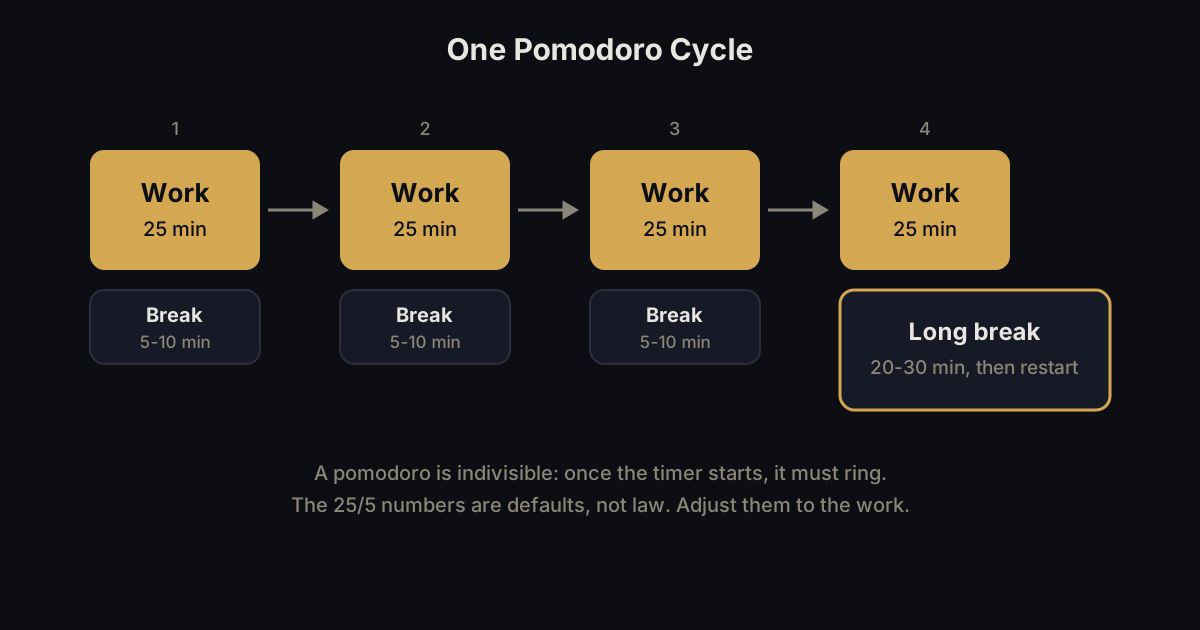
The Pomodoro Technique is a time management method that breaks work into short, timed intervals separated by breaks. Francesco Cirillo developed it in the late 1980s, according to Wikipedia, naming each interval a "pomodoro," the Italian word for tomato, after the tomato shaped kitchen timer he used as a university student.
The mechanics, per Wikipedia's description of the original method: decide on the task, set a timer for around 25 minutes, work on the task until it rings, then take a short break of 5 to 10 minutes. After four of these intervals, take a longer break of 20 to 30 minutes, then start the cycle again. No app is required to run this. A timer and a task are enough.
Wikipedia also connects the method to timeboxing and iterative, incremental development, and notes it has been adopted in pair programming contexts, where two developers trade the keyboard at the end of each pomodoro instead of running the timer solo.
Wikipedia also lists the fundamental stages the technique is built around: planning, tracking, recording, processing, and visualizing tasks. Most explainers skip straight to the timer and ignore that the method assumes a task is already written down before the clock starts. That gap matters more than the timer itself, and we come back to it later in this post.
The rules most explainers skip
Most Pomodoro explainers stop at 25 minutes of work and a 5 minute break. Todoist's productivity guide, crediting Cirillo's original method, adds rules that change how the technique actually holds up under real work.
The first is indivisibility: once a pomodoro starts, it has to run to the end. No checking email, chats, or messages until it rings. If an interruption forces its way in anyway, the guidance is to take your break and restart the pomodoro rather than pausing it midway, noting the interruption so the pattern is visible later.
The other three rules are more practical. Break down any task that needs more than four pomodoros into smaller, separately trackable pieces. Combine tasks that take less than one pomodoro into a single session. Todoist's own example groups "write rent check," "set vet appointment," and "read Pomodoro article" into one sitting. Finish a task early? Use the leftover minutes for overlearning: reviewing or deepening what you just did instead of stopping.
Cirillo's guidance treats a noted interruption as data, not just an excuse to restart. Writing down what broke a pomodoro, every time it happens, is meant to surface a pattern over a week or two, so you know which interruption to fix first instead of only reacting to the one in front of you.
When does the Pomodoro Technique actually work?
The Pomodoro Technique works best for open-ended work, distraction-prone starts, and tasks you keep putting off. Todoist's guide names the people it suits: those derailed by small distractions, those who tend to work past the point of being productive, people doing open-ended work like studying or research, people who overestimate what they can finish in a day, and people who respond to a gamified sense of progress.
It frames the method as useful for perfectionists and procrastinators alike, arguing that "it's easier to commit to 25 minutes of work at a time than a whole afternoon."
There is a research signal behind the timer too, not just anecdote. Wikipedia cites a 2025 scoping review concluding that "time-structured Pomodoro interventions consistently improved focus, reduced mental fatigue, and enhanced sustained task performance." That lines up with what the method is actually doing: turning an open-ended block of work into a bounded, low-stakes sprint.
When should you change the numbers?
Change the 25/5 split when your work does not fit it. Both Wikipedia and Todoist treat 25 minutes as a starting default, not a fixed rule. Deep creative work like writing or coding often needs longer, uninterrupted stretches than 25 minutes allows, and a break bell can cut off a flow state just as it forms. A task you are actively avoiding often needs the opposite: a shorter interval, sometimes just 5 to 15 minutes, small enough that starting feels trivial.
Todoist, citing DeskTime data, points to two studies here. A 2014 DeskTime study found 52 minutes of work paired with a 17 minute break to be optimal among the users it tracked. A 2021 rerun of that analysis found 112 minutes of work and a 26 minute break among the most productive users.
Treat both numbers as data points about work-rest ratios in general, not a replacement prescription for your day. The honest takeaway is that 25 and 5 are a reasonable place to start, and the right numbers for you depend on the task in front of you, not a rule you break by changing them.
Todoist also frames 25/5 as one end of a range rather than the only option, calling 25 to 50 minutes of work paired with 5 to 15 minute breaks the common sweet spot beyond the strict default. On the planning side, it suggests spending about 15 minutes a day mapping out your pomodoros, capping the day at 12 to 14 of them, and keeping 2 to 4 in reserve as an overflow buffer for whatever runs long.
Breaks are meant to move you away from a screen, standing, stretching, or stepping outside, rather than into a different feed. As Todoist puts it, the whole approach is about thinking in tomatoes rather than hours.
Pomodoro and ADHD
The Pomodoro Technique can work well for ADHD, but the same rule that makes it effective for other people can work against an ADHD brain. A timer makes time concrete instead of an abstract feeling, which matters because misestimating how long something will take is one of the most common struggles reported with ADHD, and a short, visible sprint is one of the most consistently recommended tactics for it. Watching 25 minutes count down replaces a guess with a fact.
The friction shows up in the indivisibility rule. Expecting a pomodoro to run uninterrupted once started assumes a level of control over attention that an ADHD brain does not reliably have on demand. Forcing a session to finish after an interruption can turn a helpful structure into another rule to feel bad about breaking.
The fix is not abandoning the timer. It is loosening the rule: treat 25 minutes as a target, not a contract, and let the interval bend around your attention instead of the other way around. For more on matching a tool to the actual mechanism you are fighting, see our broader ADHD apps guide, and if time blindness specifically is the issue, a calendar that makes time visible tackles the same problem from the scheduling side.
What do you actually need to run it?
You need a timer and a task, nothing else. The original method, per Wikipedia, is deliberately low-tech: a mechanical kitchen timer, paper, and a pencil. Any phone timer works just as well for the mechanics. If you want the technique built into a task app instead, TickTick lists a Pomodoro timer on its own features page, one of the few task apps that ships it natively rather than leaving you to a separate app.
The part almost every Pomodoro guide skips is what happens before the timer starts. Wikipedia's own list of the method's stages opens with planning and recording, which assumes a task is already written down somewhere. If your actual bottleneck is getting that task out of your head in the first place, that is a different problem than which timer to use.
That is exactly the gap a plain brain dump is built to close: get everything out first, unedited, then pick which item earns the next 25 minutes.
Full disclosure: InstantOwl is our product, and this blog belongs to it. It is not a timer and does not compete with one. It sits one step earlier: talk through everything on your plate, and it comes back as an organized list you can run through a Pomodoro session, one item at a time. InstantOwl is currently free to use.
Once you have that list, choosing a system to hold your tasks long term is a separate decision from the timer itself. And if you want those sessions placed on an actual calendar instead of run back to back with no plan, stacking pomodoros into scheduled blocks is the natural next step.
Related reading
- ADHD apps built around the mechanism you're fighting: a broader menu of tools for capture, tasks, and time.
- An ADHD-friendly calendar: for making time visible when a timer alone is not enough.
- What is a brain dump: the capture step a Pomodoro session assumes already happened.
- Choosing a task system: where a captured task lives once it is picked for the next timer.
- Time blocking: scheduling Pomodoro sessions into actual calendar blocks.
Frequently asked questions
How does the Pomodoro Technique work?
Decide on a task, set a timer for 25 minutes, and work until it rings, then take a 5 to 10 minute break. After four of these intervals, take a longer 20 to 30 minute break, then start the cycle again, per Wikipedia's description of the original method.
Why is it called Pomodoro?
Pomodoro is Italian for tomato. Francesco Cirillo, who developed the technique in the late 1980s, named each work interval after the tomato shaped kitchen timer he used as a university student, according to Wikipedia.
Is 25 minutes too short for the Pomodoro Technique?
Sometimes. Both Wikipedia and Todoist's productivity guide treat 25 minutes as a default, not a fixed rule. Deep creative work like writing or coding often benefits from longer, uninterrupted stretches, while a task you keep avoiding may work better with a shorter 5 to 15 minute interval instead.
Does the Pomodoro Technique work for ADHD?
It can, with one adjustment. A visible, counting-down timer helps with the time misestimation common in ADHD, which is why timed sprints are a widely recommended tactic. The indivisibility rule, that a pomodoro must run uninterrupted once started, can work against an ADHD brain, so treat the interval as a flexible target, not a strict contract.

Written by
Jim BreeseJim Breese is the founder of InstantOwl. He's spent 15 years building companies, from an Airbnb host community he founded and exited to growth leadership at venture-backed SaaS startups. He built InstantOwl because his best ideas kept arriving mid-walk, out of order, and half-finished.
Stop losing good ideas.
InstantOwl turns a rambling voice note into a clean, organized document in moments. Just talk. We'll organize it.
 Try InstantOwl free