How to Make a Mind Map (Tool-Agnostic, With the Part Nobody Mentions)
By Jim Breese · · Updated
What is a mind map?
A mind map is a diagram that starts with one central idea in the middle of the page and grows outward into branches. Each branch holds a related theme, and smaller sub-branches break that theme into details. British author Tony Buzan popularized the format in the 1970s, teaching it as a way to visualize thinking instead of writing it in straight lines.
Buzan did not invent the radial diagram. Tree structures and radiant diagrams predate him, drawing on techniques associated with Leonardo da Vinci and the concept maps developed by Joseph Novak. What Buzan did was name the format, teach it widely, and turn it into a repeatable method anyone could learn. Say it accurately: popularized, not invented.
Most guides that show up when you search how to make a mind map are software vendors teaching their own tool. Canva teaches Canva. MindMup teaches MindMup. The method underneath is older than any of them and does not depend on software. Once you know the moves, a mind map works the same on a napkin as it does in an app.
A mind map is also different from a to-do list or an outline, even though all three organize information. An outline groups ideas top to bottom in a fixed order. A mind map groups them around a center point with no fixed order, which is exactly why it suits ideas that connect to each other in more than one direction, like the pieces of a project that all touch the same goal but do not happen in sequence.
How do you make a mind map?
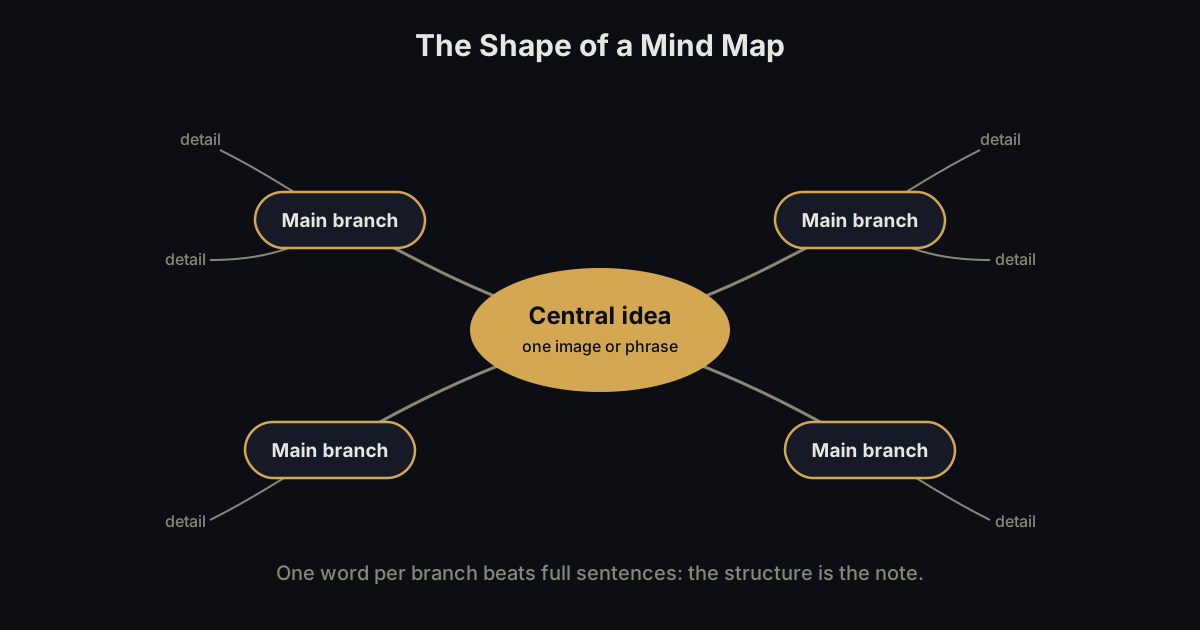
You make a mind map in four moves: write your central topic in the middle, draw branches for the major themes connected to it, add sub-branches under each branch using single words or short phrases, then rearrange and add visual cues like color as the picture gets clearer.
- Center topic. Write the single idea you are mapping in the middle of the page, circled or boxed so it stands out.
- Main branches. Draw lines out from the center, one per major theme. Keep them thick and close to the center so importance reads visually at a glance.
- Sub-branches. Add smaller offshoots under each branch for the details underneath it, using shorter phrases the further out you go.
- Rearrange and add color. Move branches around as connections show up, and color-code related themes. A small image or icon tends to stick in memory better than the same idea written as text alone.
Keywords beat sentences at every level. A branch or sub-branch that turns into a full paragraph stops working as a mind map and starts working as an outline with lines drawn on it. Short phrases keep the shape visible.
A concrete example makes the four moves easier to picture. Say the center topic is "move apartments." The main branches might be Packing, Movers, Address Changes, and Budget. Under Packing, the sub-branches could be Kitchen, Closet, and Books, each just a word or two, not a sentence. The whole map fits on one page, and every piece of the move has a place to live.
None of this depends on which tool draws the lines. The method works with a pen on a napkin the same way it works with a mouse in an app, which is worth knowing before you go shopping for software to solve a problem the software did not create.
Paper or digital: which should you use?
Paper is faster to start and forces short branches, since there is no room to type a paragraph next to a line. Digital tools let you rearrange without redrawing, add color and images without owning markers, and save the map somewhere you will not lose it.
Paper has no login, no learning curve, and nothing to load. Its downside is permanence: once you have drawn a branch in a spot, moving it means erasing or starting over, and a paper map cannot be searched later the way a digital one can.
Free digital options exist and are worth trying before paying for anything. MindMup lets you build a mind map with no sign-up at all, exporting to PDF, PNG, or plain text. Canva builds mind maps on its free Whiteboards tool, aimed at brainstorming with templates and sharing built in. Both cost nothing to try.
A hybrid habit works well too: sketch the first draft on paper, where the pen keeps you from overwriting a branch with too many words, then rebuild the cleaner version in an app once the shape has settled. That way you get paper's speed for the messy first pass and digital's flexibility for the version you actually keep.
Neither format fixes the actual bottleneck, which shows up before you draw a single line: knowing what your branches even are.
The part nobody mentions: what if you do not know your branches yet?
Every mind map guide assumes you already know your main branches when you sit down to draw. In practice, the blank circle in the center of the page is exactly as intimidating as a blank document, because a mind map still requires you to know what belongs on it before you can organize it.
This is the same problem covered in how to organize your thoughts: capture and organization are two separate jobs, and trying to do both at once is why people freeze staring at an empty page, or an empty circle.
The fix is to get the jumble out first, in whatever order it comes, before trying to arrange it into branches. Talking it out loud, writing a messy list, or a stream-of-consciousness paragraph all do the same job: they surface the themes that become your branches. Only after that does a mind map have something to actually organize.
When is a mind map the wrong tool?
A mind map is the wrong tool for anything that has to happen in a fixed order or fit into a simple list. Steps that must happen sequentially, like a recipe or a set of instructions, lose their order the moment you spread them out into branches radiating in every direction.
Live note-taking during a fast-moving talk usually fits a different format better too, since a mind map can miss the transitions between points if the speaker jumps around. Other note-taking methods, like a simple outline or a running list, handle that pace more reliably.
A mind map earns its keep for the opposite case: unpredictable, associative material where the relationships between ideas matter more than their order. Planning a project, breaking down a broad topic (the daily work of a product manager mapping a roadmap or a feature), or untangling how a handful of loose ideas connect to each other are exactly the situations a mind map was built for.
A simple grocery list is the clearest example of the wrong-tool case. There is no relationship to draw between milk and bread worth branching out for, and forcing a short flat list into a radial diagram just adds drawing time to a task that never needed it. Reach for a mind map when the ideas connect in more than one direction, and reach for a plain list when they do not.
Where InstantOwl fits
Full disclosure: InstantOwl is our product, and this blog belongs to it.
InstantOwl is built for the step before the mind map: getting the jumble out of your head in the first place. Instead of staring at a blank center circle trying to guess your branches, you talk for a few minutes about whatever is on your mind, and InstantOwl organizes what you said into themes.
Those themes are the branches a mind map needs before it can be drawn. From there you can turn them into an actual map by hand or in any tool above, or just use the organized version as it stands. InstantOwl does not replace a mind mapping tool. It replaces the blank page that comes before one. InstantOwl is currently free to use.
Related reading
- How to organize your thoughts: why capture and organizing are two separate jobs, and which one comes first.
- Note-taking methods: other frameworks, like Cornell and outlining, for when a mind map is not the right shape.
- What is a brain dump: why talking is the fastest way to get a jumble of ideas out of your head before you sort it.
Frequently asked questions
How do you create a mind map step by step?
Write your central topic in the middle of the page, draw branches out for each major theme connected to it, add sub-branches under each branch using single words or short phrases, then rearrange branches and add color or images as connections become clearer. The method works the same on paper or in any mind mapping app.
Who invented mind mapping?
Nobody invented mind mapping outright. British author Tony Buzan popularized the format in the 1970s and turned it into a repeatable method, but radial and tree diagrams predate him, drawing on techniques associated with Leonardo da Vinci and Joseph Novak's concept maps. Buzan popularized mind mapping; he did not invent the radial diagram.
Is mind mapping effective?
Mind mapping works well for associative thinking: planning a project, breaking down a broad topic, or seeing how loose ideas connect to each other, because branches show relationships a straight list cannot. It works less well for anything sequential, like steps in a process, where order matters more than connection.
What is the best free mind mapping tool?
MindMup lets you build a mind map for free with no sign-up required, exporting to PDF, PNG, or plain text. Canva also offers free mind maps built on its Whiteboards tool. Both are genuinely free to start, though check each tool's current plan details before relying on one long-term.

Written by
Jim BreeseJim Breese is the founder of InstantOwl. He's spent 15 years building companies, from an Airbnb host community he founded and exited to growth leadership at venture-backed SaaS startups. He built InstantOwl because his best ideas kept arriving mid-walk, out of order, and half-finished.
Stop losing good ideas.
InstantOwl turns a rambling voice note into a clean, organized document in moments. Just talk. We'll organize it.
 Try InstantOwl free